
A loading screen can remain visible after LoadSceneAsync completes. Save restoration, player spawning, or input setup may still be running. Before optimizing load time, define what stops the timer.
This design measures the interval from the load request to playable readiness, with intermediate timestamps for diagnosis. The API references are Unity 6.4 and Framedash Unity SDK 0.1.8.
Progress 0.9 does not establish playable readiness
With allowSceneActivation = false, Unity holds progress at 0.9 and keeps isDone false. This is a pre-activation waiting point, not a statement that 90% of bytes or CPU work has finished. Holding activation can also stall other AsyncOperation work. Do not add this hold just to instrument an otherwise ungated loader. See Unity’s activation documentation.
sceneLoaded is another distinct signal: Unity invokes it after OnEnable and before Start. Treating it as playable readiness excludes work in Start and subsequent asynchronous initialization. Keep the engine callback order separate from the game’s readiness condition.
Record four timestamps on one clock
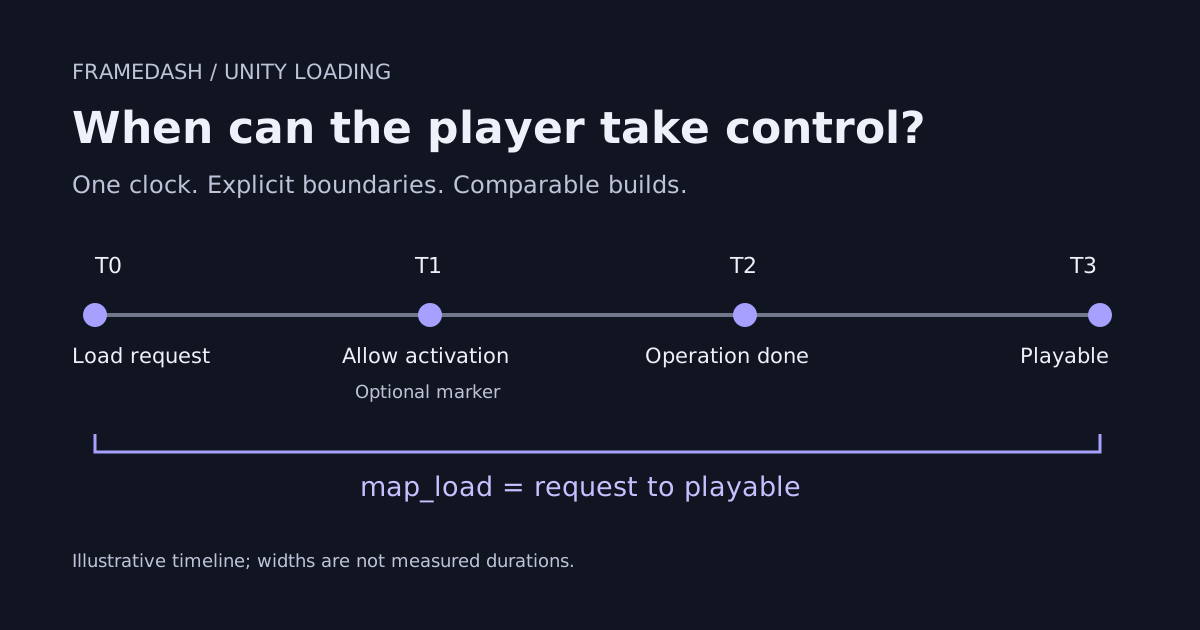
- T0: Load request. Immediately before invoking the loader
- T1: Activation permission. Immediately before setting
allowSceneActivationto true, only when the existing loader holds activation - T2: Observed scene-operation completion. When the loader observes
LoadSceneAsync.isDoneas true - T3: Playable readiness. When the game’s chosen condition holds: required initialization finished, loading overlay removed, and input accepted
T0 to T1 can include presentation delays or a wait for a Continue button. T1 to T2 is elapsed time, not pure activation CPU time: unrelated main-thread work and the delay until the coroutine checks again can contribute. Use Unity Profiler when you need to attribute that interval to individual operations.
If the loader does not gate activation, omit T1. T0 to T2 and T2 to T3 still distinguish the scene operation from the remaining wait. If readiness can arrive before T2, the caller must remember that state and call TryReportPlayable again after observing T2. The helper does not latch an early signal. T3 is the time at which both conditions are observed and reported.
Record one total and a separate breakdown
Use the same map_load boundary across compared builds. Here one load means T0 to T3. Ending at T2 in the baseline and T3 in the candidate would change the measurement even if the workload stayed identical.
The Framedash load-timing API offers BeginMapLoad / EndMapLoad and ReportMapLoad. Use the pair when the SDK owns the timer, or report milliseconds already measured by your loader. A second BeginMapLoad replaces the pending measurement. For concurrent loads, keep a separate clock per load and use ReportMapLoad.
This helper uses the latter approach. Pass an initialized SDK, create the helper at T0, optionally call MarkActivationRequested at T1, call MarkOperationDone at T2, and call TryReportPlayable at T3. Keep it in a loader that survives scene changes.
The helper’s SDK calls have been checked against SDK 0.1.8 source. Call them on Unity’s main thread. Dispatch background-loader completion back to the main thread before reporting.
using System;
using System.Collections.Generic;
using System.Diagnostics;
using Framedash;

// One instance per load. Call every method on Unity's main thread.
public sealed class LoadProbe
{
    private readonly TelemetrySDK sdk;
    private readonly string mapName;
    private readonly Stopwatch clock = Stopwatch.StartNew();
    private double? activationRequestedMs;
    private double? operationDoneMs;
    private bool reported;

    public LoadProbe(TelemetrySDK initializedSdk, string mapName)
    {
        if (initializedSdk == null)
            throw new ArgumentNullException(nameof(initializedSdk));
        if (string.IsNullOrWhiteSpace(mapName))
            throw new ArgumentException("A stable map name is required.", nameof(mapName));
        sdk = initializedSdk;
        this.mapName = mapName;
    }

    // Optional: only if the existing loader controls activation.
    public void MarkActivationRequested()
    {
        if (!reported && !activationRequestedMs.HasValue && !operationDoneMs.HasValue)
            activationRequestedMs = clock.Elapsed.TotalMilliseconds;
    }

    public void MarkOperationDone()
    {
        if (!reported && !operationDoneMs.HasValue)
            operationDoneMs = clock.Elapsed.TotalMilliseconds;
    }

    // Call when both readiness and isDone have been observed.
    // An early readiness call is not cached; call again after MarkOperationDone.
    public bool TryReportPlayable()
    {
        if (reported || !operationDoneMs.HasValue) return false;
        double totalMs = clock.Elapsed.TotalMilliseconds;
        double doneMs = operationDoneMs.Value;
        var metrics = new Dictionary<string, float>
        {
            { "scene_operation_ms", (float)doneMs },
            { "after_operation_ms", (float)(totalMs - doneMs) }
        };
        if (activationRequestedMs.HasValue)
        {
            double activationMs = activationRequestedMs.Value;
            metrics["before_activation_ms"] = (float)activationMs;
            metrics["activation_window_ms"] = (float)(doneMs - activationMs);
        }
        reported = true;
        sdk.ReportMapLoad(mapName, totalMs);
        sdk.Track("load_phases", attributes: new Dictionary<string, string>
            { { "map_name", mapName } }, metrics: metrics);
        return true;
    }
}
A true return from TryReportPlayable means that this helper ran its reporting path once. It does not confirm server receipt. Do not call it for a failed or canceled attempt; record those separately if needed rather than including them as successful loads.
load_phases and its metric names are custom definitions in this example. They do not automatically create dedicated phase charts or regression gates. The standard map_load event has an empty map_id; the map name is in attributes["map_name"], and the duration is in metrics["load_time_ms"]. It does not create a spatial heatmap point.
Both events are subject to sampling. If the verification run should retain every event at the sampling stage, set these overrides after initialization. A rate of 1 does not prevent losses caused by delivery failures or buffer limits.
TelemetrySDK.Instance.SetEventSamplingRate("map_load", 1f);
TelemetrySDK.Instance.SetEventSamplingRate("load_phases", 1f);
Check boundaries and failure cases before comparing
When integrating the helper into your own loader, check the following:
- Verify T0, T2, and T3 ordering and units in the same scene and build configuration
- In an already-gated loader, confirm that deliberate activation waiting belongs to T0 through T1
- Deliberately delay asynchronous readiness after
MarkOperationDoneand confirm that T2 to T3 grows; a delay insideAwakeor other earlier work can move T2 itself - Exercise failure, cancellation, duplicate completion, and concurrent loads without counting false successes or mixing attempts
- Separate cold starts from reloads; record the device, storage, cache conditions, and build ID
Where the sample has been verified
The helper has been tested with Unity 6000.3.25f1 (6.3 LTS) and 6000.6.4f1, using Framedash Unity SDK 0.1.8. On the same Windows x64 host, both Mono and IL2CPP were exercised with non-batchmode D3D12 hidden-window launches and with -batchmode -nographics. With the SDK and LoadProbe unchanged, the article sample’s synthetic-scene tests passed, and the Player exited normally after SDK shutdown.
In this version check, the actual map_load and load_phases payloads were decoded and received locally. Failed and canceled attempts were not sent as successful loads. A separate production Framedash smoke test confirmed stored events of both types through read-back queries. These observations confirm receipt for the tested attempts; they do not guarantee delivery of every event.
This verification covers the article sample, not the SDK’s entire test suite or performance in customer games. Visible interactive windows and physical Android / iOS devices remain untested. Run the checklist above in your own game and verify behavior on its target devices.
Fix the T0-to-T3 definition first, then investigate the longest interval. That gives the comparison a stable answer to whether a change reduced scene-loading work or the wait before player control.